
Key Takeaways
- Data modeling adoption reached 64% of organizations in 2024, up from 51% the year before — ER diagrams are the standard output of that work (Dataversity, 2024).
- SQL-aware tools (SQL Designer, DrawSQL) export runnable
CREATE TABLEDDL; generic tools (draw.io, Figma, Lucidchart) draw shapes with no SQL output. - SQL Designer has no table or diagram cap on free accounts — DrawSQL caps free diagrams at 15 tables, ChartDB at 10.
- No account needed to start — open the demo canvas, choose a dialect, and export SQL immediately.
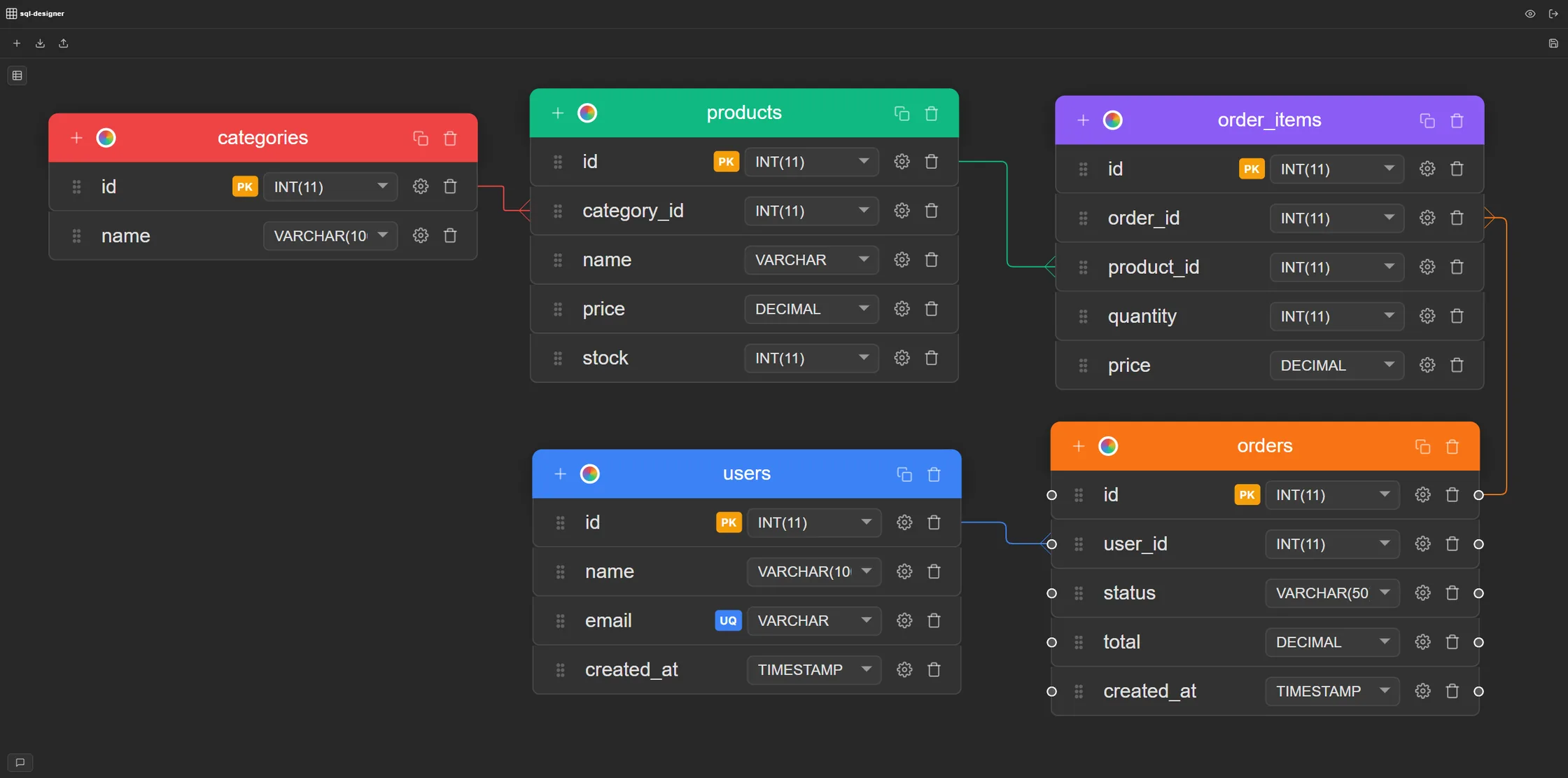
What Is an Entity-Relationship Diagram?
An entity-relationship diagram (ER diagram or ERD) is a visual map of a relational database. It shows the entities (tables), their attributes (columns), and the relationships between them (foreign keys). ER diagrams are the standard way to plan, document, and communicate database schemas before writing any SQL — and the reason a visual tool beats a blank SQL file for early-stage design.
The diagram uses a standard visual language: tables appear as boxes with columns listed inside them, and relationships are lines connecting them — with crow's foot symbols at the ends to show cardinality (one-to-one, one-to-many, many-to-many). For a full breakdown of what those symbols mean, see crow's foot notation explained.
When we built SQL Designer, the central design decision was that the diagram on the canvas and the exported SQL should always be the same thing — not a picture of a schema alongside a separate DDL file you maintain by hand. Every column type you set in the diagram becomes the exact type in the CREATE TABLE output. Change the diagram, the SQL updates. That's what separates a SQL-aware tool from a drawing tool.
SQL-Aware ER Diagram Maker vs. Generic Diagram Tool
The tool category matters more than individual features. DrawSQL caps free-tier diagrams at 15 tables per diagram (DrawSQL pricing, 2026); ChartDB at 10 (ChartDB pricing, 2026). But table caps are secondary to a more basic question: does the tool actually produce SQL? Not every tool that draws ER-diagram shapes can answer yes.
- SQL-aware ER diagram maker (SQL Designer, DrawSQL, ChartDB) — column types are real database types (
INT,VARCHAR,DECIMAL), constraints are structural (PRIMARY KEY,FOREIGN KEY,NOT NULL), and the tool exports a runnableCREATE TABLEDDL script. The diagram is the schema. - Generic diagram tool (draw.io, Figma, Lucidchart) — column types are plain text labels, there are no real constraints, and there's no SQL export. The diagram looks like a schema but is just a picture of one. Getting runnable DDL out requires translating it by hand.
We've seen teams use draw.io for early conceptual sketches — mapping out entities before committing to a structure — and that's a reasonable use of a generic tool. Where it breaks down is when someone treats a draw.io diagram as a spec and then has to write all the DDL from scratch anyway. A SQL-aware tool collapses those two steps into one.
CREATE TABLE script. Generic diagram tools use plain text labels for column types and produce no SQL output. The practical gap appears at export time: a SQL-aware tool lets you go from blank canvas to deployable DDL in one session; a generic tool requires a separate manual translation step before you have anything runnable.
How to Use the Online ER Diagram Maker
A five-table schema — the scale of most starter projects — takes under 10 minutes from blank canvas to exported SQL. The data modeling decisions take longer than the diagramming itself. In SQL Designer, we designed the flow to have zero setup overhead: open the canvas, pick your dialect, and the column type picker and export are immediately ready.
Open sql-designer.com/demo — no account needed. The canvas is ready immediately.
- Select your database — choose MySQL, PostgreSQL, SQLite, Oracle, SQL Server, or MS Access from the toolbar. This sets which column types are available in the diagram.
- Add tables — click New Table and name it after your entity:
users,orders,products. - Add columns — define column name, data type, and constraints (
PRIMARY KEY,NOT NULL,UNIQUE). Types come from a dropdown filtered to your chosen dialect — no invalid types, no cross-referencing a PostgreSQL data types reference separately. - Draw relationships — drag from a foreign key column to the primary key it references. Crow's foot notation renders automatically on the canvas. The
FOREIGN KEY ... REFERENCESclause is added to the export. - Export SQL — click Export to generate the full
CREATE TABLEscript. Copy to clipboard or download as a file.
Create a free account to save your work and return to it later — still no credit card required.
CREATE TABLE script, so the visual model and the runnable DDL stay in sync automatically. There's no manual translation step between diagram and deployable SQL.
What SQL Designer's ER Diagram Maker Includes
The features that matter in a SQL-aware ER diagram maker are different from a generic diagramming tool. Does it export real DDL? Does it know which types belong to each database? Can you import existing SQL to generate a diagram? Can you share a read-only link without requiring the recipient to sign up? SQL Designer's answer to all four is yes. The Free plan includes 1 diagram and 3 weekly combined exports; Pro removes those limits.
- Drag-and-drop canvas — pan, zoom, and rearrange tables freely; no forced auto-layout
- Six SQL dialects — MySQL, PostgreSQL, SQLite, Oracle, SQL Server, MS Access, each with accurate type pickers
- Crow's foot notation — relationship lines show cardinality (one-to-many, one-to-one) on the canvas
- Full constraint support —
PRIMARY KEY,UNIQUE,NOT NULL,AUTO_INCREMENT/SERIALper column - SQL import — paste a
CREATE TABLEscript and the diagram builds itself, including FK lines - One-click export — download a complete
CREATE TABLEDDL script for your target database - Shareable links — read-only, editable, or approval-gated; works without the recipient having an account
- Embeddable iframes — embed a live diagram in any documentation or blog post
- Free and Pro plans — Free includes 1 diagram and 3 weekly combined exports; Pro removes both limits
- Auto-save — every change saved automatically; no manual save step
See the full feature list for every detail.
Other Free Online ER Diagram Makers
SQL Designer isn't the only SQL-aware option. The free tier limits and export capabilities vary significantly between tools — here's what each one actually offers, with sources:
- DrawSQL — polished visual ER diagram maker. The free plan is capped at 15 tables per diagram and public diagrams only; private diagrams require a paid plan (DrawSQL pricing, 2026). SQL export is included on the free tier.
- dbdiagram.io — text-first (write DBML markup, get a rendered diagram). SQL export is free; the free-tier cap is 10 diagrams and public-only access (dbdiagram community). Best for code-first teams comfortable with markup syntax.
- ERDPlus — fully free with no paid tiers and no table or diagram limits (ERDPlus about page). Browser-based, designed for academic ER notation. SQL export quality is more basic compared to SQL Designer or DrawSQL; best for learning.
- ChartDB — open-source, strong for reverse-engineering existing schemas via AI-assisted import. Free tier caps at 10 tables per database (ChartDB pricing, 2026). Less suited to greenfield design.
- draw.io / Figma / Lucidchart — not ER diagram makers in the SQL sense. They draw shapes but have no SQL awareness and can't generate DDL. Use these for high-level conceptual diagrams only.
For a full side-by-side comparison including import capabilities and collaboration limits, see 11 Best Free Online ERD Tools in 2026.
Frequently Asked Questions
What is a free online ER diagram maker?
A free online ER diagram maker is a browser-based tool for creating entity-relationship diagrams — visual maps of database tables, columns, and the relationships between them — without installing any software. SQL Designer is a free online ER diagram maker that also generates the SQL CREATE TABLE script from your diagram, so the visual model and the runnable DDL always stay in sync.
What is the difference between an ER diagram maker and an ERD tool?
The terms are interchangeable. ER diagram maker and ERD tool both refer to software for visually designing database schemas. The distinction that matters is between SQL-aware tools (SQL Designer, DrawSQL) and generic diagram tools (draw.io, Figma). SQL-aware tools understand data types and constraints and export runnable DDL. Generic tools draw shapes that look like tables but cannot generate SQL.
Can I use an ER diagram maker without creating an account?
Yes. SQL Designer's demo canvas works without any account — open it, start drawing tables, and export SQL immediately. Create a free account only when you want to save your diagrams and return to them later. No credit card is ever required.
Does an online ER diagram maker export SQL?
It depends on the tool. SQL-aware ER diagram makers like SQL Designer, DrawSQL, and ChartDB export CREATE TABLE scripts. Generic diagram tools like draw.io, Figma, and Lucidchart draw visual shapes but have no SQL awareness and cannot generate DDL. SQL Designer's Free plan includes 3 weekly combined SQL, JSON, migration, or PNG exports; Pro exports are unlimited.
What databases does SQL Designer's ER diagram maker support?
SQL Designer supports six database dialects: MySQL, PostgreSQL, SQLite, Oracle, SQL Server, and MS Access. Each has a dedicated column type picker showing only types valid for that engine. Switch dialects at any time and re-export — the DDL regenerates for the new target with the correct syntax automatically.
How do I create an ER diagram online?
Open sql-designer.com/demo, select your database dialect, click New Table to add your first entity, define columns and data types, then draw foreign key relationships by connecting columns between tables. Export as a SQL CREATE TABLE script when ready. No installation or account required to start. For a step-by-step walkthrough, see How to Create a Database Schema Online.