
- Tool: SQL Designer — free, browser-based, no install
- Steps: open → create tables → define columns → draw relationships → export SQL
- Output: a valid
CREATE TABLEDDL script for MySQL, PostgreSQL, SQLite, Oracle, SQL Server, or MS Access - Time: a simple 3-table schema takes about 5 minutes from blank canvas to export
- Why visual first: data modeling adoption reached 64% of organizations in 2024, up from 51% in 2023, as teams moved from writing DDL by hand to designing schemas visually first (Dataversity Trends in Data Management 2024)
What Is a Database Schema?
A database schema is the formal structure of a relational database. In the Stack Overflow Developer Survey 2025, PostgreSQL was selected by 55.6% of respondents and MySQL by 40.5%. The survey collected 49,009 responses from 177 countries, confirming that both are widely used schema targets. A schema defines the tables, columns, data types, and constraints that govern how data is stored and how tables relate to each other. It doesn't contain data — it defines the shape that data must fit into.
Schemas are expressed as SQL DDL (Data Definition Language): a set of CREATE TABLE statements. An entity-relationship diagram (ERD) is a visual representation of the same information, with tables shown as boxes, columns listed inside them, and foreign key relationships drawn as lines between tables. A purpose-built online database schema designer keeps both in sync, so the visual diagram and the exported SQL always match.
Step 1 — Open the Online SQL Table Designer
The two dominant relational databases, PostgreSQL (55.6% of developers) and MySQL (40.5%), generate different DDL syntax for the same concepts (Stack Overflow Developer Survey 2025). Auto-increment columns, timestamp defaults, and text types all differ between engines. Picking your dialect before adding the first table determines what types appear in the dropdowns and whether the exported script runs without modification.
Go to sql-designer.com/demo and open the canvas. No account is needed to start. If you want to save your work, a free account takes under a minute with no credit card required.
Select your target dialect from the toolbar: MySQL, PostgreSQL, SQLite, Oracle, SQL Server, or MS Access. Every data type in the column dropdowns will be valid for that engine from that point forward.
Step 2 — Create Your Tables
Data modeling adoption reached 64% of organizations in 2024, up from 51% in 2023 (Dataversity Trends in Data Management 2024), as teams shifted from writing DDL by hand to designing schemas visually first. Click New Table to add a table to the canvas. Tables represent entities in your data model: the things your application tracks. For a blog, that's users, posts, categories. For e-commerce: customers, products, orders, order_items.
Start with the most central entity and work outward. Add all tables before drawing relationships. It's easier to see the full picture first and connect the dots after.
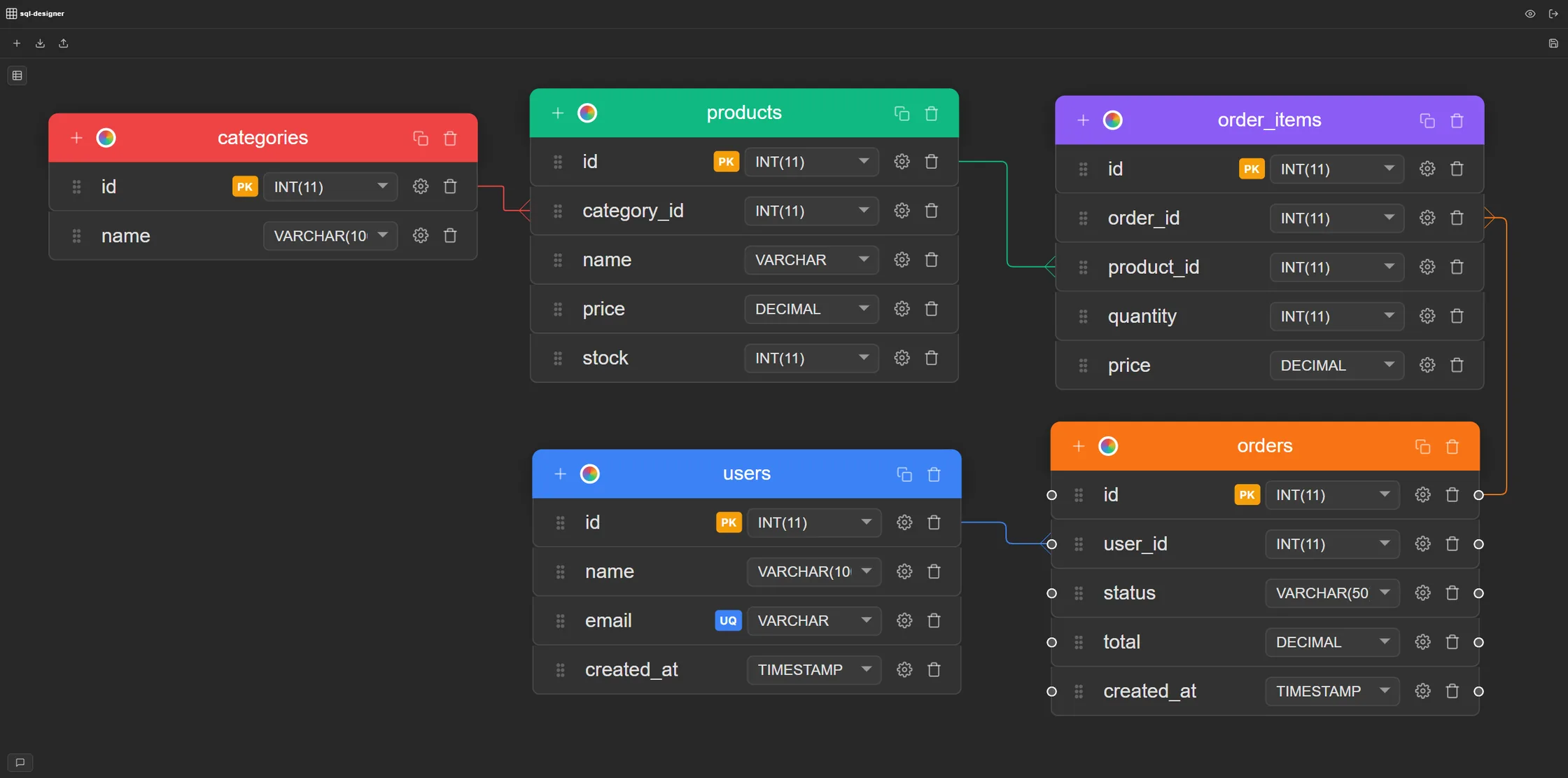
Step 3 — Define Columns and Data Types
Columns are where schemas succeed or fail in production. The wrong type choice is invisible until your tables get large, then it's expensive to fix. Use FLOAT instead of DECIMAL for a price column and you'll get silent rounding errors. Use TEXT everywhere instead of VARCHAR and you'll pay in storage and index overhead. Worth 30 seconds per column now. ALTER TABLE on a large table is painful, and the wrong type is one of those things that only becomes obvious after launch.
For each table, click Add Column and set three things:
- Name — use snake_case consistently:
user_id,created_at,product_name - Data type — choose from the dropdown. Common types:
INT/BIGINTfor IDs,VARCHAR(255)for short text,TEXTfor long content,DECIMAL(10,2)for prices,TIMESTAMPfor dates - Constraints — toggle
PRIMARY KEYon the ID column,NOT NULLon required fields,UNIQUEon fields that must not repeat (e.g., email addresses)
Every table needs a primary key. The standard approach is a surrogate auto-incrementing integer: id INT PRIMARY KEY AUTO_INCREMENT in MySQL, or id SERIAL PRIMARY KEY in PostgreSQL. SQL Designer generates the correct syntax for whichever dialect you selected in Step 1.
FLOAT for monetary values, which introduces silent rounding errors that compound over time, and using TEXT for every string column regardless of length, which adds unnecessary index overhead. Getting types right at design time costs 30 seconds per column. Fixing them after data is in the table requires a full ALTER TABLE migration.
Step 4 — Draw Foreign Key Relationships
Foreign key constraints are the only mechanism that prevents orphaned rows at the database level. That's the key point about them. Application-layer validation can't guarantee consistency when data enters outside your app: through a migration script, a bulk import, or a direct SQL client. A foreign key on posts.user_id referencing users.id means the database rejects any insert that would create a post with no valid author, regardless of how that insert arrives.
In SQL Designer, drawing a relationship is visual: click the relationship connector on a foreign key column and drag to the referenced primary key in another table. A crow's foot notation line draws automatically, and the FOREIGN KEY constraint is added to the exported SQL without any manual work.
Three relationship types you'll use most:
- One-to-many — one user can write many posts;
posts.user_idreferencesusers.id - Many-to-many — posts can belong to many categories and categories can contain many posts; resolved with a junction table (
post_categories) holding two foreign keys - One-to-one — one user has one profile;
profiles.user_idreferencesusers.idwith aUNIQUEconstraint on the foreign key column
PRAGMA foreign_keys = ON). They're the only mechanism that prevents orphaned rows at the database level. Application-layer checks alone can't guarantee consistency when data is inserted or deleted outside the app, such as during bulk imports or direct database access (Oracle Database Concepts: Data Integrity).
For a complete breakdown of the symbols and how they map to real constraints, see Crow's Foot Notation Explained.
Step 5 — Export Your SQL
MySQL, PostgreSQL, and SQLite each use different syntax for the same concept: AUTO_INCREMENT vs SERIAL vs INTEGER PRIMARY KEY AUTOINCREMENT. When the schema is complete, click Export. SQL Designer generates a full CREATE TABLE DDL script for your chosen database engine, including every column, data type, constraint, and foreign key reference. Copy the output or download it as a .sql file and run it against your database.
Need the same schema for multiple databases? MySQL in production and SQLite in tests is a common setup. Switch the dialect selector and export again. The DDL is regenerated correctly for the new target with no manual editing.
We test every export path against a real MySQL and PostgreSQL instance before each release — running the generated CREATE TABLE script end to end, not just checking that it parses. That's the bar we hold the exporter to: if the script doesn't run cleanly against a live database on the first try, it's a bug, not an edge case to document around.
AUTO_INCREMENT vs SERIAL vs INTEGER PRIMARY KEY AUTOINCREMENT. Text types, timestamp defaults, and boolean handling also differ between engines. Switching dialects without a tool means rewriting every one of those definitions by hand — and DDL syntax errors typically surface only when you run the script, not before.
For a side-by-side comparison of how DDL syntax differs between MySQL, PostgreSQL, Oracle, SQL Server, and SQLite, see the DDL syntax comparison guide.
See the process in action — this walkthrough covers relational schema design from entity identification to final DDL:
Example: Designing a Blog Database Schema Online
Here's a practical example. This is the core schema for a blog application, and it mirrors the structure we used when building the content management for this tool. Four tables, two relationship types — enough to cover what you'll encounter in most real applications.
Tables and columns
users—idPK,usernameVARCHAR UNIQUE,emailVARCHAR UNIQUE NOT NULL,password_hashVARCHAR NOT NULL,created_atTIMESTAMPposts—idPK,user_idINT NOT NULL (FK → users.id),titleVARCHAR NOT NULL,slugVARCHAR UNIQUE NOT NULL,bodyTEXT,published_atTIMESTAMPcategories—idPK,nameVARCHAR NOT NULL,slugVARCHAR UNIQUE NOT NULLpost_categories—post_idINT (FK → posts.id),category_idINT (FK → categories.id), PRIMARY KEY (post_id,category_id)
Relationships to draw
posts.user_id→users.id— one-to-many (one user, many posts)post_categories.post_id→posts.id— many-to-many side Apost_categories.category_id→categories.id— many-to-many side B
Create all four tables on the canvas, define the columns, then draw the three relationship lines. The complete MySQL CREATE TABLE script exports in one click. For more schema templates covering e-commerce, SaaS, task trackers, and messaging apps, see Database Schema Examples.
users, posts, categories, and a post_categories junction table, covers both one-to-many and many-to-many relationship types in a single design. The same structural patterns — surrogate PKs, NOT NULL constraints on required fields, junction tables for many-to-many — apply across most application domains, from e-commerce to task management.
Tips for Designing a Relational Database Online
Schema design mistakes fall into two categories: the ones you catch immediately and the ones that surface six months after launch when ALTER TABLE on millions of rows locks your database for minutes. These aren't abstract rules. Each one maps to a class of mistake that's trivial to get right at design time and expensive to fix once there's real data in the table.
- Pick a naming convention and stick to it — either consistently singular (
user,post) or plural (users,posts). Mixed conventions create ambiguity across queries, ORM mappings, and API responses. - Every table needs a primary key — use a surrogate integer ID unless you have a compelling reason for a natural key. Natural keys change; surrogate keys don't.
- Name foreign keys after the referenced table —
user_idis better thanuid. The name should make the reference obvious without reading the constraint definition. - Add
created_atandupdated_atto every table — you'll almost always need these for auditing, caching, or cursor-based pagination. Add them at design time, not as an afterthought. - Use
DECIMALfor money, neverFLOAT— floating-point types introduce rounding errors that compound over time. They're wrong for financial values, full stop. - Normalize first, denormalize only when needed — start with 3NF to eliminate redundancy, then denormalize specific tables if query performance actually requires it. See Database Normalization — 1NF, 2NF, 3NF.
- Review the diagram before exporting — a two-minute pass over the canvas makes it easy to spot missing relationships, tables that should be split, or columns that belong in a lookup table. Much cheaper than a migration script.
FLOAT for monetary values, skipping created_at/updated_at audit columns, and mixing naming conventions are all in this category: invisible at low data volumes, painful to fix at scale without a full migration.
Frequently Asked Questions
How do I create a database schema online for free?
Open SQL Designer. It's browser-based and requires no installation. The Free plan includes 1 diagram and 3 weekly combined exports; Pro removes both limits. Click the demo to try without an account, or sign up to save your work.
What is a database schema?
A database schema is the structure of a relational database: the tables, columns, data types, constraints (PRIMARY KEY, FOREIGN KEY, UNIQUE, NOT NULL), and relationships between tables. It defines what data can be stored and how it's organized, without containing the data itself. A schema is typically expressed as SQL DDL (CREATE TABLE statements) or visualized as an entity-relationship diagram (ERD).
What is the difference between a database schema and a database diagram?
A database schema is the formal SQL definition of the structure: CREATE TABLE statements with column types and constraints. A database diagram (ERD) is the visual representation — tables as boxes, columns inside them, relationships as lines. A purpose-built online database schema designer keeps both in sync. Every canvas change updates the SQL, and the export always reflects exactly what you drew.
Can I create a schema online without knowing SQL?
Yes. SQL Designer is built for visual schema design. You add tables by clicking, define columns by selecting from dropdowns, toggle constraints on and off, and draw relationships with your mouse. The SQL is generated for you. No DDL knowledge required to get started, and the exported script runs as-is.
How do I design a relational database online?
Designing a relational database online follows the same process as designing one locally, without installing any software. Identify your entities (tables), define their attributes (columns and data types), establish relationships (foreign keys), apply normalization to reduce redundancy, then export the resulting SQL. SQL Designer handles all of this in the browser: free, no install, and no account required to start.
Can I import an existing SQL schema to visualize it?
Yes. Paste an existing CREATE TABLE script into SQL Designer and it renders as a visual diagram automatically, foreign key relationship lines included. It's useful for documenting or redesigning an existing database: the diagram builds itself, and you can edit it visually before exporting the updated schema.
Do I need an account to use SQL Designer?
No. The demo at sql-designer.com/demo is available without creating an account. You can design tables, draw relationships, and export SQL right away. Creating a free account lets you save your work and access it from any device. No credit card required.